♿ Accessible Document — PDF/UA Compliant
The recommended pattern for every production document. Fully accessible with tagged structure, reading order, and artifact marking.
Accessible Document
using ObviousPDF;
using ObviousPDF.Accessibility;
using ObviousPDF.Fonts;

var doc = new PdfDocument();
doc.Info.Title = "Accessible Document";
doc.Language = "en-US";
doc.DisplayDocTitle = true;
doc.PdfUaConformance = PdfUaConformanceLevel.PdfUA1;
var root = doc.EnableTaggedPdf();

var sect = root.AddChild(StructureType.Sect);
var h1 = sect.AddChild(StructureType.H1);
var pIntro = sect.AddChild(StructureType.P);

// List structure
var list = sect.AddChild(StructureType.L);
var li1 = list.AddChild(StructureType.LI);
var li1Lbl = li1.AddChild(StructureType.Lbl);
var li1Body = li1.AddChild(StructureType.LBody);

var page = doc.AddPage();

// Decorative header — artifact
page.BeginArtifact(PdfArtifactType.Layout);
page.FillRectangle(0, 760, 612, 32,
    new PdfDrawOptions { FillColor = PdfColor.FromRgb(0.15, 0.3, 0.6) });
page.EndArtifact();

page.AddTaggedText(h1, "Welcome to ObviousPDF", 72, 720,
    new PdfTextOptions { Font = StandardFont.HelveticaBold, FontSize = 22 });
page.AddTaggedText(pIntro, "This document is fully accessible.", 72, 690);

// Tagged list
page.AddTaggedText(li1Lbl, "•", 82, 660);
page.AddTaggedText(li1Body, "Tagged PDF for screen readers", 95, 660);

page.AddArtifactText("Page 1", 285, 30, PdfArtifactType.Pagination);

doc.Save("accessible_document.pdf");
Imports ObviousPDF
Imports ObviousPDF.Accessibility
Imports ObviousPDF.Fonts
Dim doc As New PdfDocument()
doc.Info.Title = "Accessible Document"
doc.Language = "en-US"
doc.DisplayDocTitle = True
doc.PdfUaConformance = PdfUaConformanceLevel.PdfUA1
Dim root = doc.EnableTaggedPdf()
Dim sect = root.AddChild(StructureType.Sect)
Dim h1 = sect.AddChild(StructureType.H1)
Dim pIntro = sect.AddChild(StructureType.P)
' List structure
Dim list = sect.AddChild(StructureType.L)
Dim li1 = list.AddChild(StructureType.LI)
Dim li1Lbl = li1.AddChild(StructureType.Lbl)
Dim li1Body = li1.AddChild(StructureType.LBody)
Dim page = doc.AddPage()
' Decorative header — artifact
page.BeginArtifact(PdfArtifactType.Layout)
page.FillRectangle(0, 760, 612, 32,
New PdfDrawOptions With { .FillColor = PdfColor.FromRgb(0.15, 0.3, 0.6) })
page.EndArtifact()
page.AddTaggedText(h1, "Welcome to ObviousPDF", 72, 720,
New PdfTextOptions With { .Font = StandardFont.HelveticaBold, .FontSize = 22 })
page.AddTaggedText(pIntro, "This document is fully accessible.", 72, 690)
' Tagged list
page.AddTaggedText(li1Lbl, "•", 82, 660)
page.AddTaggedText(li1Body, "Tagged PDF for screen readers", 95, 660)
page.AddArtifactText("Page 1", 285, 30, PdfArtifactType.Pagination)
doc.Save("accessible_document.pdf")open ObviousPDF
open ObviousPDF.Accessibility
open ObviousPDF.Fonts
let doc = PdfDocument()
doc.Info.Title <- "Accessible Document"
doc.Language <- "en-US"
doc.DisplayDocTitle <- true
doc.PdfUaConformance <- PdfUaConformanceLevel.PdfUA1
let root = doc.EnableTaggedPdf()
let sect = root.AddChild(StructureType.Sect)
let h1 = sect.AddChild(StructureType.H1)
let pIntro = sect.AddChild(StructureType.P)
// List structure
let list = sect.AddChild(StructureType.L)
let li1 = list.AddChild(StructureType.LI)
let li1Lbl = li1.AddChild(StructureType.Lbl)
let li1Body = li1.AddChild(StructureType.LBody)
let page = doc.AddPage()
// Decorative header — artifact
page.BeginArtifact(PdfArtifactType.Layout)
page.FillRectangle(0.0, 760.0, 612.0, 32.0,
PdfDrawOptions(FillColor = PdfColor.FromRgb(0.15, 0.3, 0.6)))
page.EndArtifact()
page.AddTaggedText(h1, "Welcome to ObviousPDF", 72.0, 720.0,
PdfTextOptions(Font = StandardFont.HelveticaBold, FontSize = 22.0))
page.AddTaggedText(pIntro, "This document is fully accessible.", 72.0, 690.0)
// Tagged list
page.AddTaggedText(li1Lbl, "\u2022", 82.0, 660.0)
page.AddTaggedText(li1Body, "Tagged PDF for screen readers", 95.0, 660.0)
page.AddArtifactText("Page 1", 285.0, 30.0, PdfArtifactType.Pagination)
doc.Save("accessible_document.pdf")Add-Type -Path "ObviousPDF.dll"
$doc = [ObviousPDF.PdfDocument]::new()
# Step 1: Required document metadata
$doc.Info.Title = "Accessible Document"
$doc.Language = "en-US" # REQUIRED
$doc.DisplayDocTitle = $true # REQUIRED
$doc.PdfUaConformance =
[ObviousPDF.PdfUaConformanceLevel]::PdfUA1
# Step 2: Enable tagged PDF
$root = $doc.EnableTaggedPdf()
# Step 3: Build structure tree
$sect = $root.AddChild([ObviousPDF.Accessibility.StructureType]::Sect)
$h1 = $sect.AddChild([ObviousPDF.Accessibility.StructureType]::H1)
$pIntro = $sect.AddChild([ObviousPDF.Accessibility.StructureType]::P)
# List structure
$list = $sect.AddChild([ObviousPDF.Accessibility.StructureType]::L)
$li1 = $list.AddChild([ObviousPDF.Accessibility.StructureType]::LI)
$li1Lbl = $li1.AddChild([ObviousPDF.Accessibility.StructureType]::Lbl)
$li1Body = $li1.AddChild([ObviousPDF.Accessibility.StructureType]::LBody)
# Step 4: Add tagged content to page
$page = $doc.AddPage()
# Decorative header — ARTIFACT (not structural)
$page.BeginArtifact([ObviousPDF.Accessibility.PdfArtifactType]::Layout)
$page.FillRectangle(0, 760, 612, 32,
[ObviousPDF.PdfDrawOptions]@{
FillColor = [ObviousPDF.PdfColor]::FromRgb(0.15, 0.3, 0.6)
})
$page.EndArtifact()
# Tagged heading
$page.AddTaggedText($h1, "Welcome to ObviousPDF",
72, 720, [ObviousPDF.PdfTextOptions]@{
Font = [ObviousPDF.Fonts.StandardFont]::HelveticaBold
FontSize = 22
})
# Tagged paragraph
$page.AddTaggedText($pIntro,
"This document is fully accessible.",
72, 690)
# Tagged list items
$page.AddTaggedText($li1Lbl, [char]0x2022, 82, 660)
$page.AddTaggedText($li1Body,
"Tagged PDF for screen readers",
95, 660)
# Page number — ARTIFACT
$page.AddArtifactText("Page 1", 285, 30,
[ObviousPDF.Accessibility.PdfArtifactType]::Pagination)
# Step 5: Validate
$checker = [ObviousPDF.Accessibility.PdfAccessibilityChecker]::new()
$report = $checker.Check($doc)
# $report.IsFullyCompliant -eq $true ✅
$doc.Save("accessible.pdf")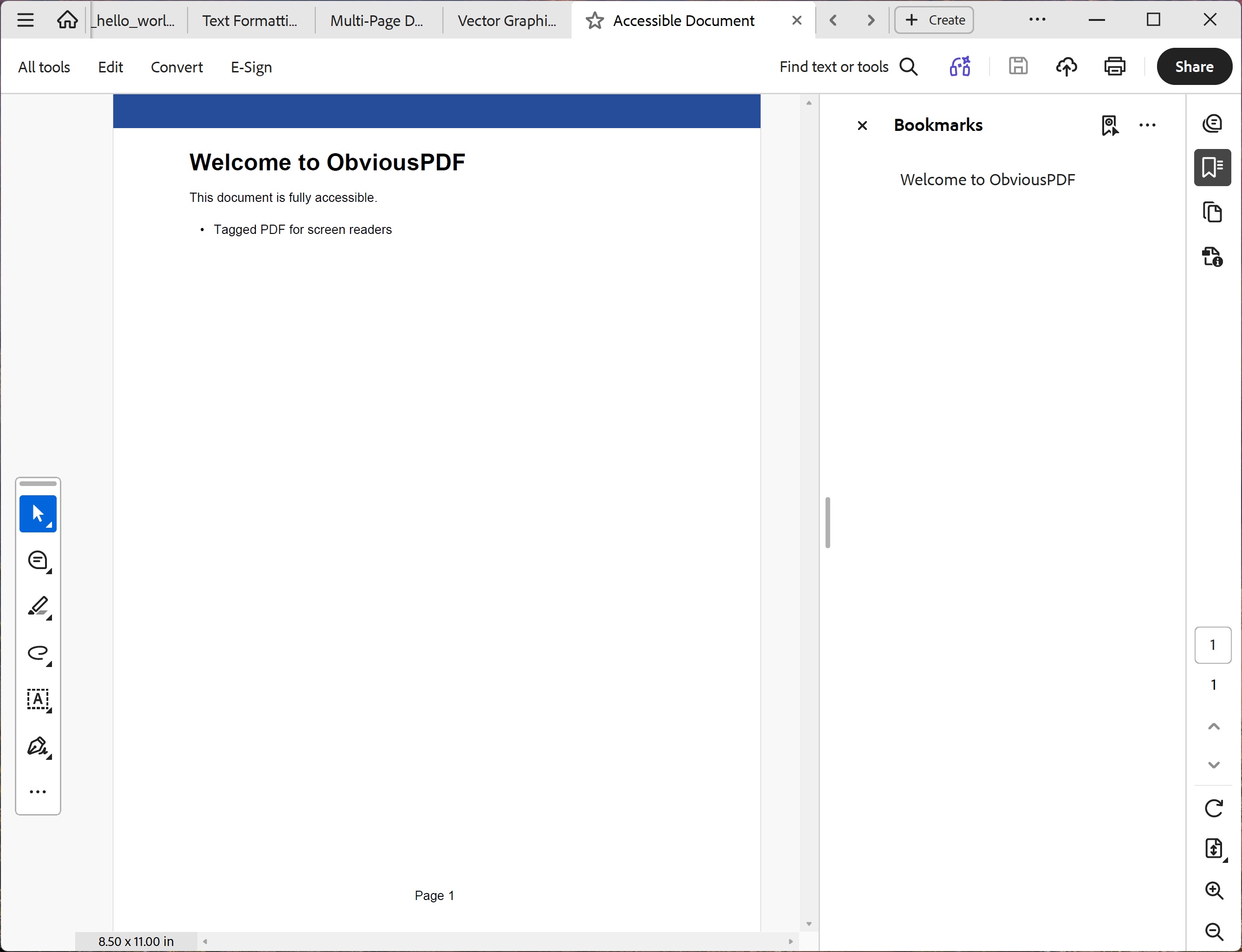
You should see a solid dark-blue header bar spanning the full page width, a bold 22 pt heading "Welcome to ObviousPDF", a short introductory paragraph, and one bulleted list item reading "Tagged PDF for screen readers". A "Page 1" artifact appears at the bottom centre. In Adobe Acrobat's Tags panel the tree should show Document › Sect › H1, P, L › LI › Lbl, LBody.
File: 05_accessible_document.pdf
PDF/UA Checklist
| Requirement | Code | PDF/UA Clause |
|---|---|---|
| Document language | doc.Language = "en-US" | §7.1 |
| Document title | doc.Info.Title = "..." | §7.1 |
| Display title in viewer | doc.DisplayDocTitle = true | §7.1 |
| Tagged PDF enabled | doc.EnableTaggedPdf() | §7.1 |
| All content tagged | AddTaggedText() | §7.2 |
| Decorative content as artifacts | BeginArtifact() | §7.1 |
| Correct heading hierarchy | H1 → H2 → H3 (no skipping) | §7.4.2 |
| Figures have alt text + BBox | AddChild(Figure, "alt") | §7.3 |
| PDF/UA identifier | PdfUaConformanceLevel.PdfUA1 | §6.7.11 |
⚠️ Disclaimer: The automated accessibility features and reports provided by ObviousPDF are intended solely to assist in the assessment of document accessibility. They are not a comprehensive accessibility audit. To confirm that WCAG or PDF/UA standards are fully met, it is recommended to have human assessment by an accessibility specialist.