📊 CSV Renderer — Accessible PDFs from Spreadsheets
ObviousPDF.Csv renders CSV documents into tagged, accessible PDFs. Set accessible,true in the [DOCUMENT] section for automatic PDF/UA-1 compliance — designed for authoring in Excel, Google Sheets, or any text editor.
using ObviousPDF.Csv;

// Render from a CSV file to a PDF file
PdfCsvRenderer.RenderFromFile(
    csvPath:    "form-1040ea.csv",
    outputPath: "form-1040ea.pdf");

// — or — render from a CSV string in memory
string csv = File.ReadAllText("form-1040ea.csv");
PdfCsvRenderer.Render(csv, "form-1040ea.pdf");

// — or — validate before rendering
var validator = new PdfCsvValidator();
var validation = validator.Validate(csv);
if (!validation.IsValid)
{
    Console.WriteLine(validation);
    return;
}

// — or — build a PdfDocument for further manipulation
using ObviousPDF;
using ObviousPDF.Accessibility;

PdfDocument doc = PdfCsvRenderer.BuildDocument(csv);

var checker = new PdfAccessibilityChecker();
PdfAccessibilityReport report = checker.Check(doc);

foreach (var result in report.Results)
    Console.WriteLine($"[{result.Feature}] {result.Description}");

doc.Save("form-1040ea.pdf");
Add-Type -Path "ObviousPDF.dll"
Add-Type -Path "ObviousPDF.Csv.dll"
# Render from CSV file to PDF
[ObviousPDF.Csv.PdfCsvRenderer]::RenderFromFile(
"form-1040ea.csv",
"form-1040ea.pdf")
# Or render from a CSV string
$csv = Get-Content "form-1040ea.csv" -Raw
[ObviousPDF.Csv.PdfCsvRenderer]::Render($csv, "form-1040ea.pdf")The form-1040ea.csv file is a complete 3-page IRS Form 1040 (2024) with Schedule 1 — identical visual output to the JSON and XML versions, using accessible,true for automatic PDF/UA-1 conformance.
Form 1040 (Easy Accessibility) — CSV
The same IRS Form 1040 from the JSON example and the XML Renderer page, expressed as CSV. The [DOCUMENT] section sets accessible,true to enable all automatic accessibility features.
# Form 1040 - U.S. Individual Income Tax Return (2024)
# Enhanced Accessibility version: uses structureTag auto-tagging.

[DOCUMENT]
coordinateOrigin,topLeft
accessible,true
language,en-US
displayDocTitle,true
pdfVersion,2.0
info.title,"Form 1040 - U.S. Individual Income Tax Return (2024)"
info.author,Department of the Treasury - Internal Revenue Service

[FONTS]
id,mode,standardFont,bundledFont,path,description,data
title-font,standardFont,HelveticaBold,,,,
body-font,standardFont,Helvetica,,,,
section-font,standardFont,HelveticaBold,,,,

[PAGE 1 size=Letter]
type,x,y,...,text,...,structureTag,artifact,artifactType
rectangle,0,0,...,,,,true,background
text,160,28,...,U.S. Individual Income Tax Return,...,H1,,
text,36,90,...,Filing Status,...,H2,,
checkboxField,40,110,...,,,,,
textField,36,185,...,,,,,Same Element — Three Formats
A single text field expressed in JSON, XML, and CSV:
{
  "type": "textField",
  "name": "first_name",
  "x": 36, "y": 185,
  "width": 200, "height": 18,
  "required": true,
  "tooltip": "Your first name"
}<TextField name="first_name"
x="36" y="185"
width="200" height="18"
required="true"
tooltip="Your first name" />textField,36,185,,,,,200,18,,,,,,,,,,,,first_name,true,,Your first name,,,,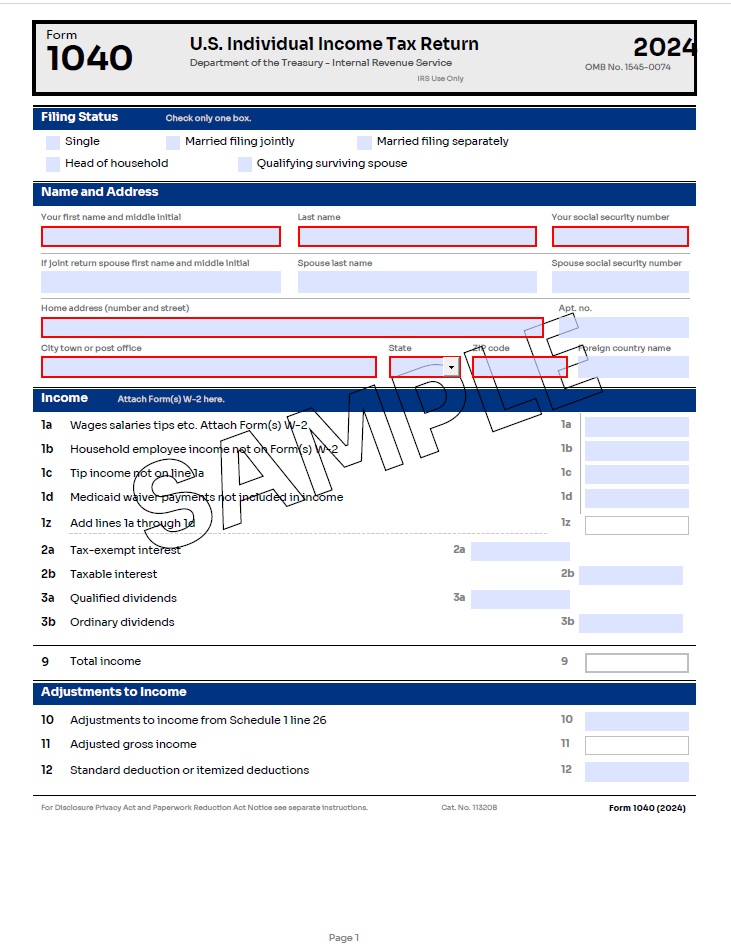
accessible,trueOverride structureTag for Semantic Structure
By default, accessible,true auto-tags every non-artifact text element as <P>. Use the structureTag column to apply richer semantics:
# structureTag column values: H1, H2, H3, H4, H5, H6, P, BlockQuote, Caption, Span

[PAGE 1 size=Letter]
type,x,y,...,text,...,structureTag,artifact,artifactType
text,160,28,...,Form Title,...,H1,,
text,36,90,...,Filing Status,...,H2,,
text,36,130,...,Check the box,...,P,,
text,36,500,...,* See instructions,...,BlockQuote,,
rectangle,0,780,...,,,,true,backgroundBuilt-in Accessibility Report
Enable generateAccessibilityReport,true in the [DOCUMENT] section — or set it via PdfCsvRendererOptions — to receive a detailed accessibility report after rendering:
[DOCUMENT]
accessible,true
generateAccessibilityReport,true
language,en-USusing ObviousPDF.Csv;
string csv = File.ReadAllText("form-1040ea.csv");
// Option 1: RenderWithReport returns the report
PdfCsvRenderResult result = PdfCsvRenderer.RenderWithReport(csv, "output.pdf");
if (result.AccessibilityReport != null)
{
foreach (var item in result.AccessibilityReport.Results)
Console.WriteLine($"[{item.Feature}] {item.Description}");
}
// Option 2: Set via options object
var options = new PdfCsvRendererOptions
{
GenerateAccessibilityReport = true
};
PdfCsvRenderer.RenderFromFile("form-1040ea.csv", "output.pdf", options);