🏷️ Page Labels
Custom page numbering: Roman numerals for front matter, decimal for body, prefixed for appendices.
Page Labels
using ObviousPDF;
using ObviousPDF.Accessibility;
using ObviousPDF.Fonts;

var doc = new PdfDocument();
doc.Info.Title = "Page Labels";
doc.Language = "en-US";
doc.DisplayDocTitle = true;
var root = doc.EnableTaggedPdf();

// Front matter: lowercase Roman (i, ii, iii)
doc.AddPageLabels(0, PdfPageLabelStyle.LowerRoman);
// Body: decimal starting at 1
doc.AddPageLabels(2, PdfPageLabelStyle.Decimal);
// Appendix: prefixed (A-1, A-2...)
doc.AddPageLabels(4, PdfPageLabelStyle.Decimal, "A-", 1);

string[] pageNames = {
    "Cover (page i)", "Preface (page ii)",
    "Chapter 1 (page 1)", "Chapter 2 (page 2)",
    "Appendix (page A-1)"
};

for (int i = 0; i < pageNames.Length; i++)
{
    var page = doc.AddPage();
    var h1 = root.AddChild(StructureType.H1);
    page.AddTaggedText(h1, pageNames[i], 72, 720,
        new PdfTextOptions { Font = StandardFont.HelveticaBold, FontSize = 18 });

    var p = root.AddChild(StructureType.P);
    page.AddTaggedText(p,
        "Check the page label shown in your PDF viewer's navigation panel.",
        72, 690, new PdfTextOptions { FontSize = 12 });
}

doc.Save("page_labels.pdf");
Imports ObviousPDF
Imports ObviousPDF.Accessibility
Imports ObviousPDF.Fonts
Dim doc As New PdfDocument()
doc.Info.Title = "Page Labels"
doc.Language = "en-US"
doc.DisplayDocTitle = True
Dim root = doc.EnableTaggedPdf()
' Front matter: lowercase Roman (i, ii, iii)
doc.AddPageLabels(0, PdfPageLabelStyle.LowerRoman)
' Body: decimal starting at 1
doc.AddPageLabels(2, PdfPageLabelStyle.Decimal)
' Appendix: prefixed (A-1, A-2...)
doc.AddPageLabels(4, PdfPageLabelStyle.Decimal, "A-", 1)
Dim pageNames() As String = {
"Cover (page i)", "Preface (page ii)",
"Chapter 1 (page 1)", "Chapter 2 (page 2)",
"Appendix (page A-1)"
}
For i As Integer = 0 To pageNames.Length - 1
Dim page = doc.AddPage()
Dim h1 = root.AddChild(StructureType.H1)
page.AddTaggedText(h1, pageNames(i), 72, 720,
New PdfTextOptions With { .Font = StandardFont.HelveticaBold, .FontSize = 18 })
Dim p = root.AddChild(StructureType.P)
page.AddTaggedText(p,
"Check the page label shown in your PDF viewer's navigation panel.",
72, 690, New PdfTextOptions With { .FontSize = 12 })
Next
doc.Save("page_labels.pdf")open ObviousPDF
open ObviousPDF.Accessibility
open ObviousPDF.Fonts
let doc = PdfDocument()
doc.Info.Title <- "Page Labels"
doc.Language <- "en-US"
doc.DisplayDocTitle <- true
let root = doc.EnableTaggedPdf()
// Front matter: lowercase Roman (i, ii, iii)
doc.AddPageLabels(0, PdfPageLabelStyle.LowerRoman)
// Body: decimal starting at 1
doc.AddPageLabels(2, PdfPageLabelStyle.Decimal)
// Appendix: prefixed (A-1, A-2...)
doc.AddPageLabels(4, PdfPageLabelStyle.Decimal, "A-", 1)
let pageNames = [|
"Cover (page i)"; "Preface (page ii)"
"Chapter 1 (page 1)"; "Chapter 2 (page 2)"
"Appendix (page A-1)"
|]
for i in 0 .. pageNames.Length - 1 do
let page = doc.AddPage()
let h1 = root.AddChild(StructureType.H1)
page.AddTaggedText(h1, pageNames.[i], 72.0, 720.0,
PdfTextOptions(Font = StandardFont.HelveticaBold, FontSize = 18.0))
let p = root.AddChild(StructureType.P)
page.AddTaggedText(p,
"Check the page label shown in your PDF viewer's navigation panel.",
72.0, 690.0, PdfTextOptions(FontSize = 12.0))
doc.Save("page_labels.pdf")Add-Type -Path "ObviousPDF.dll"
$doc = [ObviousPDF.PdfDocument]::new()
$doc.Info.Title = "Page Labels"
$doc.Language = "en-US"
$doc.DisplayDocTitle = $true
# Add pages to fill all three label ranges
for ($i = 0; $i -lt 6; $i++) {
$p = $doc.AddPage()
$p.AddText("Page $($i + 1)", 72, 720)
}
# Front matter: lowercase Roman (i, ii, iii)
$doc.AddPageLabels(0,
[ObviousPDF.PdfPageLabelStyle]::LowercaseRoman)
# Body: decimal starting at 1 (1, 2, 3...)
$doc.AddPageLabels(2,
[ObviousPDF.PdfPageLabelStyle]::Decimal)
# Appendix: prefixed (A-1, A-2...)
$doc.AddPageLabels(4,
[ObviousPDF.PdfPageLabelStyle]::Decimal, "A-", 1)
$doc.Save("c:\temp\page_labels.pdf")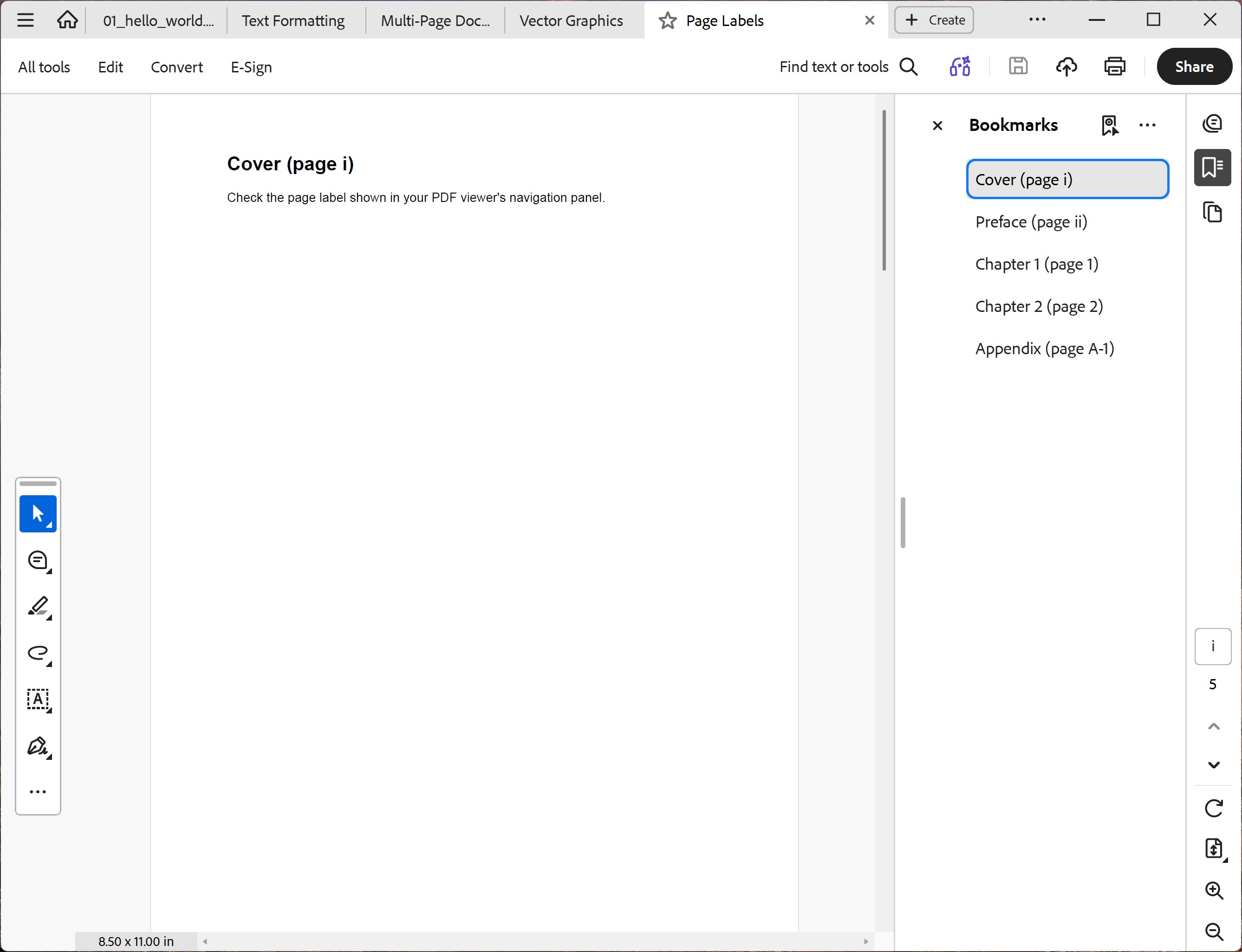
You should see five pages. Check the page-number indicator in your PDF viewer's toolbar — it should read i, ii, 1, 2, and A-1 as you flip through. Each page displays its label name as a heading (e.g. "Cover (page i)") and a reminder to check the viewer's navigation panel.
File: 10_page_labels.pdf
Available Styles
| Style | Output | Common Use |
|---|---|---|
Decimal | 1, 2, 3, 4… | Body pages |
LowercaseRoman | i, ii, iii, iv… | Front matter |
UppercaseRoman | I, II, III, IV… | Front matter |
LowercaseLetters | a, b, c, d… | Sub-sections |
UppercaseLetters | A, B, C, D… | Appendices |