⚡ JSON Renderer — Form 1040 (Easy Accessibility)
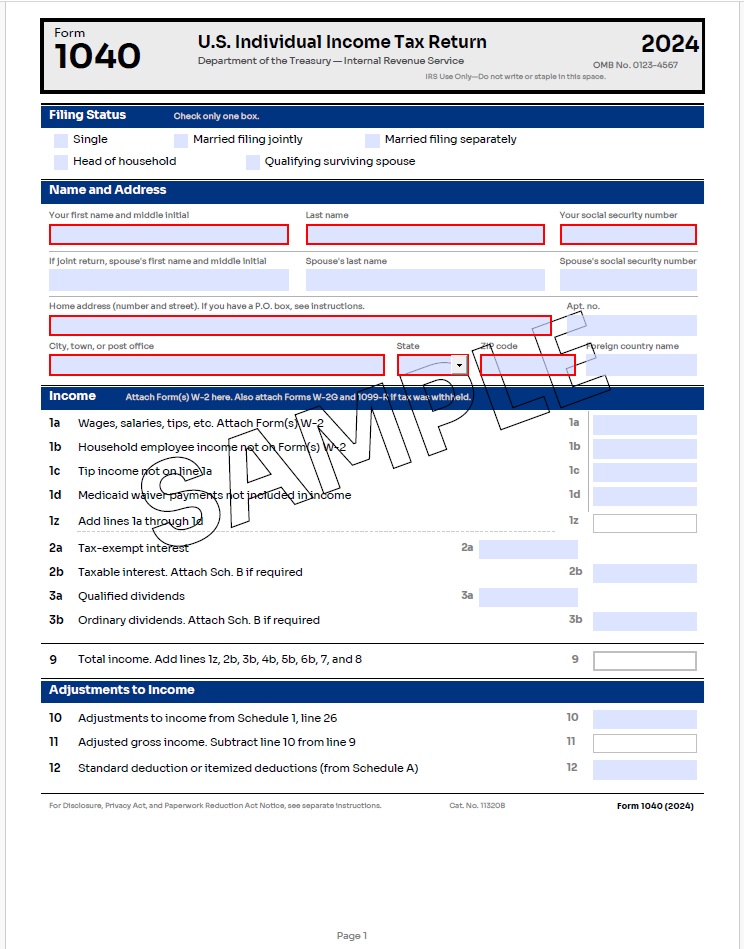
The same 3-page IRS Form 1040 as the tagged version, but using "accessible": true instead of a manual structure tree — PDF/UA-1 compliant with dramatically simpler JSON.
Render Form 1040 (Easy Accessibility) from JSON
using ObviousPDF.Json;

// Render straight from a JSON file to a PDF file
PdfJsonRenderer.RenderFromFile(
    jsonPath:   "form-1040ea.json",
    outputPath: "form-1040ea.pdf");

// — or — render from a JSON string in memory
string json = File.ReadAllText("form-1040ea.json");
PdfJsonRenderer.Render(json, "form-1040ea.pdf");

// — or — build a PdfDocument for further manipulation
using ObviousPDF;
using ObviousPDF.Accessibility;

PdfDocument doc = PdfJsonRenderer.BuildDocument(json);

// Run the built-in accessibility checker
var checker = new PdfAccessibilityChecker();
PdfAccessibilityReport report = checker.Check(doc);

foreach (var result in report.Results)
    Console.WriteLine($"[{result.Feature}] {result.Description}");

doc.Save("form-1040ea.pdf");
Imports ObviousPDF.Json
' Render straight from a JSON file to a PDF file
PdfJsonRenderer.RenderFromFile(
jsonPath:="form-1040ea.json",
outputPath:="form-1040ea.pdf")
' — or — render from a JSON string in memory
Dim json As String = File.ReadAllText("form-1040ea.json")
PdfJsonRenderer.Render(json, "form-1040ea.pdf")
' — or — build a PdfDocument for further manipulation
Imports ObviousPDF
Imports ObviousPDF.Accessibility
Dim doc As PdfDocument = PdfJsonRenderer.BuildDocument(json)
' Run the built-in accessibility checker
Dim checker As New PdfAccessibilityChecker()
Dim report As PdfAccessibilityReport = checker.Check(doc)
For Each result In report.Results
Console.WriteLine($"[{result.Feature}] {result.Description}")
Next
doc.Save("form-1040ea.pdf")open ObviousPDF.Json
// Render straight from a JSON file to a PDF file
PdfJsonRenderer.RenderFromFile(
jsonPath = "form-1040ea.json",
outputPath = "form-1040ea.pdf")
// Or render from a JSON string in memory
let json = System.IO.File.ReadAllText("form-1040ea.json")
PdfJsonRenderer.Render(json, "form-1040ea.pdf")
// Or build a PdfDocument for further manipulation
open ObviousPDF
open ObviousPDF.Accessibility
let doc = PdfJsonRenderer.BuildDocument(json)
let checker = PdfAccessibilityChecker()
let report = checker.Check(doc)
doc.Save("form-1040ea.pdf")Add-Type -Path "ObviousPDF.dll"
Add-Type -Path "ObviousPDF.Json.dll"
# Render straight from a JSON file to a PDF file
[ObviousPDF.Json.PdfJsonRenderer]::RenderFromFile(
"form-1040ea.json",
"form-1040ea.pdf")
# Or render from a JSON string
$json = Get-Content "form-1040ea.json" -Raw
[ObviousPDF.Json.PdfJsonRenderer]::Render($json, "form-1040ea.pdf")
# Or build a PdfDocument for further manipulation
$doc = [ObviousPDF.Json.PdfJsonRenderer]::BuildDocument($json)
$checker = [ObviousPDF.Accessibility.PdfAccessibilityChecker]::new()
$report = $checker.Check($doc)
$doc.Save("form-1040ea.pdf")The form-1040ea.json file is a complete 3-page IRS Form 1040 (2024) with Schedule 1 — identical visual output to the tagged version, but using "accessible": true for automatic PDF/UA-1 conformance. No structureTree or structureId values are needed.
What "accessible": true Does
Setting "accessible": true at the root of your JSON document automatically enables all of the following — with zero additional configuration:
| Feature | What Happens | Standard Reference |
|---|---|---|
| Tagged PDF | Structure tree root created; /MarkInfo << /Marked true >> set | ISO 32000-2 §14.8 |
| PDF/UA-1 conformance | XMP metadata declares pdfuaid:part = 1 | ISO 14289-1 §7.1 |
| Auto-tag text | Every non-artifact text / textBlock → <P> structure element | Matterhorn 01-003 |
| Auto-tag images | Every non-artifact image → <Figure> with /Alt | ISO 14289-1 §7.3 |
| Auto-tag form fields | Every form field → <P> → <Form> structure element | ISO 14289-1 §7.18.4 |
| Font auto-upgrade | Standard 14 fonts → embedded substitutes with full Unicode CMap | ISO 14289-1 §7.21 |
| Display document title | /ViewerPreferences << /DisplayDocTitle true >> | Matterhorn 07-001 |
| Document language | /Lang set from document.language | ISO 14289-1 §7.2 |
| Tab order | Pages with annotations get /Tabs /S | Matterhorn 28-008 |
JSON Structure — Easy vs. Tagged
Compare the root-level JSON for both approaches. The easy-accessible version eliminates the entire structureTree and all structureId references:
Easy Accessible (form-1040ea.json)
{
  "coordinateOrigin": "topLeft",
  "accessible": true,
  "document": {
    "info": {
      "title": "Form 1040 — U.S. Individual Income Tax Return (2024)",
      "author": "Department of the Treasury — Internal Revenue Service",
      "subject": "U.S. Individual Income Tax Return"
    },
    "language": "en-US",
    "pdfVersion": "2.0"
  },
  "fonts": [ ... ],
  "outlines": [ ... ],
  "pages": [
    {
      "size": "Letter",
      "content": [
        { "type": "text", "text": "Form 1040", "x": 36, "y": 18,
          "options": { "fontRef": "title-font", "fontSize": 24 } },

        { "type": "textField", "name": "wages",
          "x": 490, "y": 349, "width": 87, "height": 16,
          "tooltip": "Line 1a: Total wages" },

        { "type": "rectangle", "x": 30, "y": 30,
          "width": 552, "height": 18, "mode": "fill",
          "artifact": true, "artifactType": "layout",
          "drawOptions": { "fillColor": { "r": 0, "g": 0.2, "b": 0.5 } } }
      ]
    }
  ]
}
Tagged (form-1040.json)
{
  "coordinateOrigin": "topLeft",
  "tagged": true,
  "document": {
    ...
    "pdfUa": "PdfUA1"
  },
  "fonts": [ ... ],
  "outlines": [ ... ],
  "structureTree": {
    "type": "Document",
    "children": [
      { "id": "h1-title",   "type": "H1" },
      { "id": "p-line-1a",  "type": "P"  },
      { "id": "form-wages", "type": "Form" },
      ...hundreds more...
    ]
  },
  "pages": [
    {
      "size": "Letter",
      "content": [
        { "type": "text", "text": "Form 1040", "x": 36, "y": 18,
          "structureId": "h1-title",
          "options": { "fontRef": "title-font", "fontSize": 24 } },

        { "type": "textField", "name": "wages",
          "structureId": "form-wages",
          "x": 490, "y": 349, "width": 87, "height": 16,
          "tooltip": "Line 1a: Total wages" },
        ...
      ]
    }
  ]
}