📋 Interactive Forms
Text fields, checkboxes, dropdowns, and signature fields with accessible tooltips.
Interactive Forms
using ObviousPDF;
using ObviousPDF.Accessibility;
using ObviousPDF.Fonts;

var doc = new PdfDocument();
doc.Info.Title = "Interactive Form";
doc.Language = "en-US";
doc.DisplayDocTitle = true;
var root = doc.EnableTaggedPdf();
var page = doc.AddPage();

var h1 = root.AddChild(StructureType.H1);
page.AddTaggedText(h1, "Registration Form", 72, 740,
    new PdfTextOptions { Font = StandardFont.HelveticaBold, FontSize = 20 });

var pName = root.AddChild(StructureType.P);
page.AddTaggedText(pName, "Full Name:", 72, 700,
    new PdfTextOptions { FontSize = 12 });

var formSE = root.AddChild(StructureType.Form);
var field = new PdfAcroField(PdfAcroFieldType.Text, "fullName", 72, 675, 250, 20)
{
    Tooltip = "Full name (required)",
    Required = true
};
page.AddTaggedAcroField(formSE, field);

page.AddDropdownField("country", 72, 615, 250, 20,
    new[] { "USA", "UK", "Canada" },
    tooltip: "Select your country");

page.AddCheckboxField("agree", 72, 545, 14,
    tooltip: "Accept terms (required)", required: true);

page.AddSignatureField("sig", 72, 480, 200, 40,
    tooltip: "Sign here");

doc.Save("interactive_form.pdf");
Imports ObviousPDF
Imports ObviousPDF.Accessibility
Imports ObviousPDF.Fonts
Dim doc As New PdfDocument()
doc.Info.Title = "Interactive Form"
doc.Language = "en-US"
doc.DisplayDocTitle = True
Dim root = doc.EnableTaggedPdf()
Dim page = doc.AddPage()
Dim h1 = root.AddChild(StructureType.H1)
page.AddTaggedText(h1, "Registration Form", 72, 740,
New PdfTextOptions With { .Font = StandardFont.HelveticaBold, .FontSize = 20 })
Dim pName = root.AddChild(StructureType.P)
page.AddTaggedText(pName, "Full Name:", 72, 700,
New PdfTextOptions With { .FontSize = 12 })
Dim formSE = root.AddChild(StructureType.Form)
Dim field = New PdfAcroField(PdfAcroFieldType.Text, "fullName", 72, 675, 250, 20) With {
.Tooltip = "Full name (required)",
.Required = True
}
page.AddTaggedAcroField(formSE, field)
page.AddDropdownField("country", 72, 615, 250, 20,
New String() {"USA", "UK", "Canada"}, tooltip:="Select your country")
page.AddCheckboxField("agree", 72, 545, 14,
tooltip:="Accept terms (required)", required:=True)
page.AddSignatureField("sig", 72, 480, 200, 40, tooltip:="Sign here")
doc.Save("interactive_form.pdf")open ObviousPDF
open ObviousPDF.Accessibility
open ObviousPDF.Fonts
let doc = PdfDocument()
doc.Info.Title <- "Interactive Form"
doc.Language <- "en-US"
doc.DisplayDocTitle <- true
let root = doc.EnableTaggedPdf()
let page = doc.AddPage()
let h1 = root.AddChild(StructureType.H1)
page.AddTaggedText(h1, "Registration Form", 72.0, 740.0,
PdfTextOptions(Font = StandardFont.HelveticaBold, FontSize = 20.0))
let pName = root.AddChild(StructureType.P)
page.AddTaggedText(pName, "Full Name:", 72.0, 700.0, PdfTextOptions(FontSize = 12.0))
let formSE = root.AddChild(StructureType.Form)
let field = PdfAcroField(PdfAcroFieldType.Text, "fullName", 72.0, 675.0, 250.0, 20.0)
field.Tooltip <- "Full name (required)"
field.Required <- true
page.AddTaggedAcroField(formSE, field)
page.AddDropdownField("country", 72.0, 615.0, 250.0, 20.0,
[|"USA"; "UK"; "Canada"|], tooltip = "Select your country")
page.AddCheckboxField("agree", 72.0, 545.0, 14.0,
tooltip = "Accept terms (required)", required = true)
page.AddSignatureField("sig", 72.0, 480.0, 200.0, 40.0, tooltip = "Sign here")
doc.Save("interactive_form.pdf")Add-Type -Path "ObviousPDF.dll"
$doc = [ObviousPDF.PdfDocument]::new()
$doc.Info.Title = "Interactive Forms"
$doc.Language = "en-US"
$doc.DisplayDocTitle = $true
$root = $doc.EnableTaggedPdf()
$page = $doc.AddPage()
# Accessible tagged text field
$formSE = $root.AddChild([ObviousPDF.Accessibility.StructureType]::Form)
$field = [ObviousPDF.PdfAcroField]::new(
[ObviousPDF.PdfAcroFieldType]::Text, "fullName",
72, 675, 250, 20)
$field.Tooltip = "Full name (required)"
$field.Required = $true
$page.AddTaggedAcroField($formSE, $field)
# Dropdown with options
$page.AddDropdownField("country",
72, 590, 250, 20,
@("USA", "UK", "Canada"),
"Select your country")
# Checkbox
$page.AddCheckboxField("agree",
72, 545, 14, $false,
"Accept terms (required)", $true)
# Signature field
$page.AddSignatureField("sig",
72, 480, 200, 40,
"Sign here")
$doc.Save("c:\temp\interactive_forms.pdf")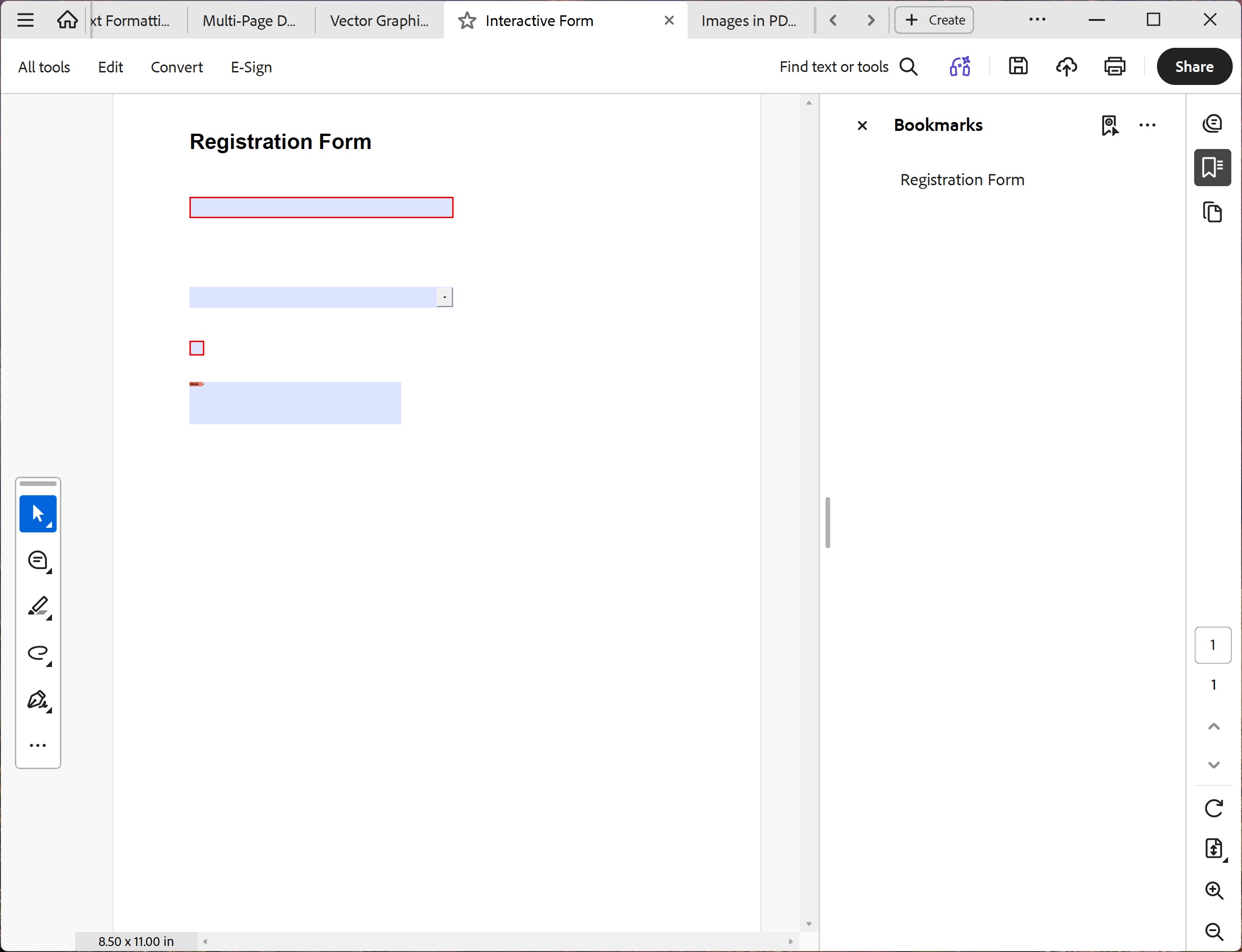
You should see a bold "Registration Form" heading, a 250 pt wide text input box for Full Name (tooltip: "Full name (required)"), a Country dropdown defaulting to "USA", a checkbox for accepting terms, and a tall signature box. All fields are interactive — click them in any PDF viewer.
File: 08_interactive_forms.pdf