🗄️ PDF/A Archival
Long-term archival format with embedded fonts, XMP metadata, and ICC colour profiles.
PDF/A-2b Archival
using ObviousPDF;
using ObviousPDF.Accessibility;
using ObviousPDF.Fonts;

var doc = new PdfDocument();
doc.Info.Title = "Archival Document";
doc.Info.Author = "ObviousPDF";
doc.Info.Subject = "PDF/A-2b compliance demonstration";
doc.Language = "en-US";
doc.DisplayDocTitle = true;
doc.PdfAConformance = PdfAConformanceLevel.PdfA2B;

var root = doc.EnableTaggedPdf();
var page = doc.AddPage();

var h1 = root.AddChild(StructureType.H1);
page.AddTaggedText(h1, "PDF/A Archival Document", 72, 740,
    new PdfTextOptions { Font = StandardFont.HelveticaBold, FontSize = 20 });

var p1 = root.AddChild(StructureType.P);
page.AddTaggedTextBlock(p1, new[]
{
    "This document conforms to PDF/A-2b (ISO 19005-2).",
    "It is suitable for long-term archival storage.",
    "",
    "PDF/A ensures that the document can be reproduced",
    "identically in the future, regardless of the software",
    "or operating system used to view it."
}, 72, 700, new PdfTextOptions { FontSize = 12, Leading = 18 });

var h2 = root.AddChild(StructureType.H2);
page.AddTaggedText(h2, "What PDF/A Includes", 72, 580,
    new PdfTextOptions { Font = StandardFont.HelveticaBold, FontSize = 16 });

var list = root.AddChild(StructureType.L);
string[] items = {
    "Embedded fonts (all glyphs available)",
    "XMP metadata (Dublin Core, PDF schemas)",
    "sRGB ICC colour profile (OutputIntent)",
    "No external dependencies or JavaScript"
};
double listY = 550;
foreach (var item in items)
{
    var li = list.AddChild(StructureType.LI);
    var lbl = li.AddChild(StructureType.Lbl);
    var lbody = li.AddChild(StructureType.LBody);
    page.AddTaggedText(lbl, "•", 82, listY, new PdfTextOptions { FontSize = 12 });
    page.AddTaggedText(lbody, item, 95, listY, new PdfTextOptions { FontSize = 12 });
    listY -= 22;
}

doc.Save("pdfa_archival.pdf");
Imports ObviousPDF
Imports ObviousPDF.Accessibility
Imports ObviousPDF.Fonts
Dim doc As New PdfDocument()
doc.Info.Title = "Archival Document"
doc.Info.Author = "ObviousPDF"
doc.Info.Subject = "PDF/A-2b compliance demonstration"
doc.Language = "en-US"
doc.DisplayDocTitle = True
doc.PdfAConformance = PdfAConformanceLevel.PdfA2B
Dim root = doc.EnableTaggedPdf()
Dim page = doc.AddPage()
Dim h1 = root.AddChild(StructureType.H1)
page.AddTaggedText(h1, "PDF/A Archival Document", 72, 740,
New PdfTextOptions With { .Font = StandardFont.HelveticaBold, .FontSize = 20 })
Dim p1 = root.AddChild(StructureType.P)
page.AddTaggedTextBlock(p1, New String() {
"This document conforms to PDF/A-2b (ISO 19005-2).",
"It is suitable for long-term archival storage.",
"",
"PDF/A ensures that the document can be reproduced",
"identically in the future, regardless of the software",
"or operating system used to view it."
}, 72, 700, New PdfTextOptions With { .FontSize = 12, .Leading = 18 })
Dim h2 = root.AddChild(StructureType.H2)
page.AddTaggedText(h2, "What PDF/A Includes", 72, 580,
New PdfTextOptions With { .Font = StandardFont.HelveticaBold, .FontSize = 16 })
Dim list = root.AddChild(StructureType.L)
Dim items() As String = {
"Embedded fonts (all glyphs available)",
"XMP metadata (Dublin Core, PDF schemas)",
"sRGB ICC colour profile (OutputIntent)",
"No external dependencies or JavaScript"
}
Dim listY As Double = 550
For Each item In items
Dim li = list.AddChild(StructureType.LI)
Dim lbl = li.AddChild(StructureType.Lbl)
Dim lbody = li.AddChild(StructureType.LBody)
page.AddTaggedText(lbl, ChrW(&H2022), 82, listY, New PdfTextOptions With { .FontSize = 12 })
page.AddTaggedText(lbody, item, 95, listY, New PdfTextOptions With { .FontSize = 12 })
listY -= 22
Next
doc.Save("pdfa_archival.pdf")open ObviousPDF
open ObviousPDF.Accessibility
open ObviousPDF.Fonts
let doc = PdfDocument()
doc.Info.Title <- "Archival Document"
doc.Info.Author <- "ObviousPDF"
doc.Info.Subject <- "PDF/A-2b compliance demonstration"
doc.Language <- "en-US"
doc.DisplayDocTitle <- true
doc.PdfAConformance <- PdfAConformanceLevel.PdfA2B
let root = doc.EnableTaggedPdf()
let page = doc.AddPage()
let h1 = root.AddChild(StructureType.H1)
page.AddTaggedText(h1, "PDF/A Archival Document", 72.0, 740.0,
PdfTextOptions(Font = StandardFont.HelveticaBold, FontSize = 20.0))
let p1 = root.AddChild(StructureType.P)
page.AddTaggedTextBlock(p1, [|
"This document conforms to PDF/A-2b (ISO 19005-2)."
"It is suitable for long-term archival storage."
""
"PDF/A ensures that the document can be reproduced"
"identically in the future, regardless of the software"
"or operating system used to view it."
|], 72.0, 700.0, PdfTextOptions(FontSize = 12.0, Leading = 18.0))
let h2 = root.AddChild(StructureType.H2)
page.AddTaggedText(h2, "What PDF/A Includes", 72.0, 580.0,
PdfTextOptions(Font = StandardFont.HelveticaBold, FontSize = 16.0))
let list = root.AddChild(StructureType.L)
let items = [|
"Embedded fonts (all glyphs available)"
"XMP metadata (Dublin Core, PDF schemas)"
"sRGB ICC colour profile (OutputIntent)"
"No external dependencies or JavaScript"
|]
let mutable listY = 550.0
for item in items do
let li = list.AddChild(StructureType.LI)
let lbl = li.AddChild(StructureType.Lbl)
let lbody = li.AddChild(StructureType.LBody)
page.AddTaggedText(lbl, "\u2022", 82.0, listY, PdfTextOptions(FontSize = 12.0))
page.AddTaggedText(lbody, item, 95.0, listY, PdfTextOptions(FontSize = 12.0))
listY <- listY - 22.0
doc.Save("pdfa_archival.pdf")Add-Type -Path "ObviousPDF.dll"
$doc = [ObviousPDF.PdfDocument]::new()
$doc.Info.Title = "Archival Document"
$doc.Info.Author = "ObviousPDF"
$doc.Language = "en-US"
$doc.DisplayDocTitle = $true
# Declare PDF/A-2b conformance
# Automatically adds: XMP metadata,
# OutputIntent, sRGB ICC profile
$doc.PdfAConformance =
[ObviousPDF.PdfAConformanceLevel]::PdfA2B
# Build tagged content as usual...
$root = $doc.EnableTaggedPdf()
$page = $doc.AddPage()
$h1 = $root.AddChild([ObviousPDF.Accessibility.StructureType]::H1)
$page.AddTaggedText($h1,
"PDF/A Archival Document", 72, 740)
$doc.Save("c:\temp\pdfa_archival.pdf")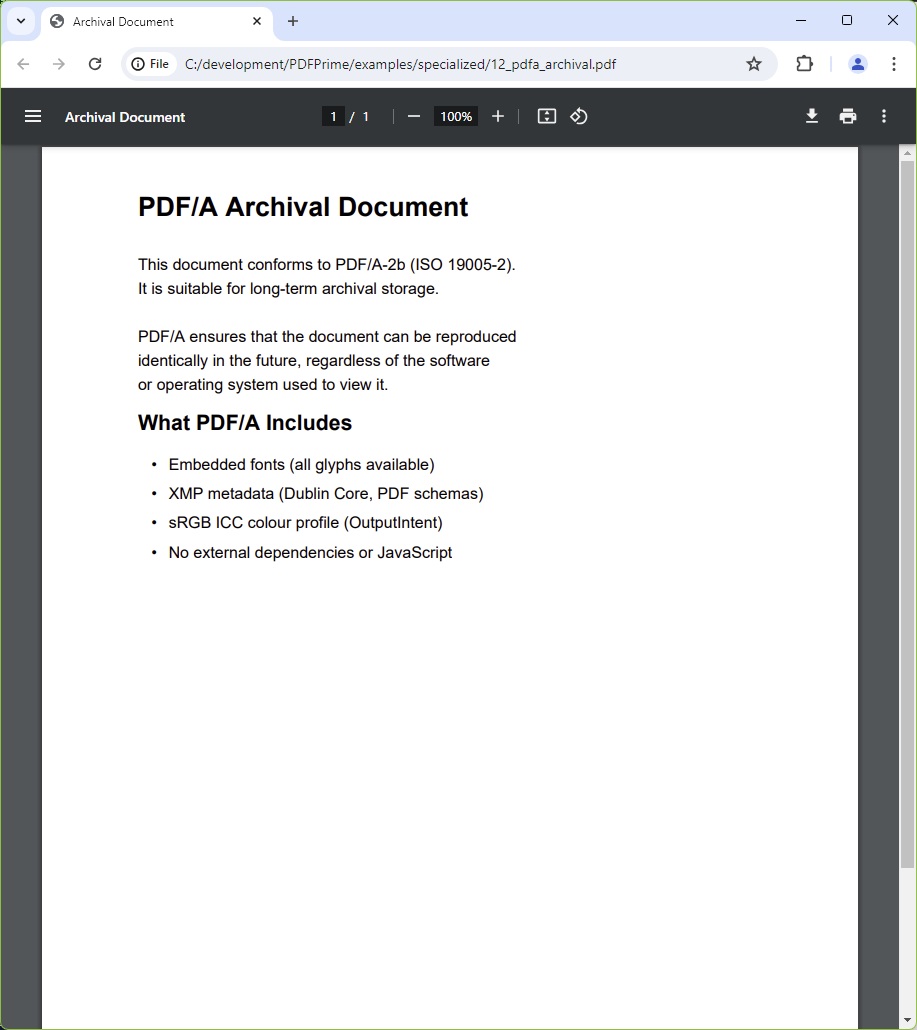
You should see a bold "PDF/A Archival Document" heading, a multi-line paragraph about ISO 19005-2 conformance, a "What PDF/A Includes" sub-heading, and a four-item bulleted list (embedded fonts, XMP metadata, sRGB ICC profile, no external dependencies). Adobe Acrobat should display a blue PDF/A conformance bar at the top of the viewport.
File: 12_pdfa_archival.pdf
Conformance Levels
| Level | ISO Standard | Key Feature |
|---|---|---|
PdfA1B | ISO 19005-1 | Basic archival (PDF 1.4 base) |
PdfA2B | ISO 19005-2 | JPEG2000, transparency support |
PdfA3B | ISO 19005-3 | Embedded files (attachments) |