🎨 Vector Graphics
Lines, shapes, Bézier paths, dash patterns, and alpha transparency.
Vector Graphics
using ObviousPDF;
using ObviousPDF.Accessibility;
using ObviousPDF.Fonts;

var doc = new PdfDocument();
doc.Info.Title = "Vector Graphics";
doc.Language = "en-US";
doc.DisplayDocTitle = true;
var root = doc.EnableTaggedPdf();
var page = doc.AddPage();

var h1 = root.AddChild(StructureType.H1);
page.AddTaggedText(h1, "Vector Graphics", 72, 740,
    new PdfTextOptions { Font = StandardFont.HelveticaBold, FontSize = 20 });

page.BeginArtifact(PdfArtifactType.Layout);

// Lines
page.DrawLine(72, 700, 250, 700);
page.DrawLine(72, 680, 250, 680, new PdfDrawOptions
{
    DashPattern = new[] { 8.0, 4.0 },
    StrokeColor = PdfColor.FromRgb(0, 0, 0.7)
});

// Shapes
page.FillRectangle(100, 600, 80, 50,
    new PdfDrawOptions { FillColor = PdfColor.FromRgb(0.2, 0.5, 0.8) });
page.FillCircle(220, 560, 30,
    new PdfDrawOptions { FillColor = PdfColor.FromRgb(0, 0.7, 0.3) });

// Polygon (triangle)
page.FillPolygon(new[]
{
    (100.0, 440.0), (150.0, 500.0), (200.0, 440.0)
}, new PdfDrawOptions { FillColor = PdfColor.FromRgb(1.0, 0.5, 0.0) });

// Bezier curve path
page.BeginPath(new PdfDrawOptions
{
    FillColor = PdfColor.FromRgb(0.3, 0.3, 0.8),
    LineWidth = 1.5
})
.MoveTo(300, 440)
.CurveTo(420, 520, 440, 480, 420, 440)
.ClosePath()
.FillAndStroke();

// Transparent overlapping circles
page.SaveGraphicsState();
page.SetAlpha(fillAlpha: 0.5);
page.FillCircle(140, 350, 40,
    new PdfDrawOptions { FillColor = PdfColor.FromRgb(1, 0, 0) });
page.FillCircle(170, 350, 40,
    new PdfDrawOptions { FillColor = PdfColor.FromRgb(0, 1, 0) });
page.FillCircle(155, 380, 40,
    new PdfDrawOptions { FillColor = PdfColor.FromRgb(0, 0, 1) });
page.RestoreGraphicsState();

page.EndArtifact();

doc.Save("vector_graphics.pdf");
Imports ObviousPDF
Imports ObviousPDF.Accessibility
Imports ObviousPDF.Fonts
Dim doc As New PdfDocument()
doc.Info.Title = "Vector Graphics"
doc.Language = "en-US"
doc.DisplayDocTitle = True
Dim root = doc.EnableTaggedPdf()
Dim page = doc.AddPage()
Dim h1 = root.AddChild(StructureType.H1)
page.AddTaggedText(h1, "Vector Graphics", 72, 740,
New PdfTextOptions With { .Font = StandardFont.HelveticaBold, .FontSize = 20 })
page.BeginArtifact(PdfArtifactType.Layout)
' Lines
page.DrawLine(72, 700, 250, 700)
page.DrawLine(72, 680, 250, 680, New PdfDrawOptions With {
.DashPattern = New Double() {8.0, 4.0},
.StrokeColor = PdfColor.FromRgb(0, 0, 0.7)
})
' Shapes
page.FillRectangle(100, 600, 80, 50,
New PdfDrawOptions With { .FillColor = PdfColor.FromRgb(0.2, 0.5, 0.8) })
page.FillCircle(220, 560, 30,
New PdfDrawOptions With { .FillColor = PdfColor.FromRgb(0, 0.7, 0.3) })
' Polygon (triangle)
page.FillPolygon(New (Double, Double)() {
(100.0, 440.0), (150.0, 500.0), (200.0, 440.0)
}, New PdfDrawOptions With { .FillColor = PdfColor.FromRgb(1.0, 0.5, 0.0) })
' Bezier curve path
page.BeginPath(New PdfDrawOptions With {
.FillColor = PdfColor.FromRgb(0.3, 0.3, 0.8),
.LineWidth = 1.5
}) _
.MoveTo(300, 440) _
.CurveTo(420, 520, 440, 480, 420, 440) _
.ClosePath() _
.FillAndStroke()
' Transparent overlapping circles
page.SaveGraphicsState()
page.SetAlpha(fillAlpha:=0.5)
page.FillCircle(140, 350, 40,
New PdfDrawOptions With { .FillColor = PdfColor.FromRgb(1, 0, 0) })
page.FillCircle(170, 350, 40,
New PdfDrawOptions With { .FillColor = PdfColor.FromRgb(0, 1, 0) })
page.FillCircle(155, 380, 40,
New PdfDrawOptions With { .FillColor = PdfColor.FromRgb(0, 0, 1) })
page.RestoreGraphicsState()
page.EndArtifact()
doc.Save("vector_graphics.pdf")open ObviousPDF
open ObviousPDF.Accessibility
open ObviousPDF.Fonts
let doc = PdfDocument()
doc.Info.Title <- "Vector Graphics"
doc.Language <- "en-US"
doc.DisplayDocTitle <- true
let root = doc.EnableTaggedPdf()
let page = doc.AddPage()
let h1 = root.AddChild(StructureType.H1)
page.AddTaggedText(h1, "Vector Graphics", 72.0, 740.0,
PdfTextOptions(Font = StandardFont.HelveticaBold, FontSize = 20.0))
page.BeginArtifact(PdfArtifactType.Layout)
// Lines
page.DrawLine(72.0, 700.0, 250.0, 700.0)
let dashO = PdfDrawOptions()
dashO.DashPattern <- [| 8.0; 4.0 |]
dashO.StrokeColor <- PdfColor.FromRgb(0.0, 0.0, 0.7)
page.DrawLine(72.0, 680.0, 250.0, 680.0, dashO)
// Shapes
page.FillRectangle(100.0, 600.0, 80.0, 50.0,
PdfDrawOptions(FillColor = PdfColor.FromRgb(0.2, 0.5, 0.8)))
page.FillCircle(220.0, 560.0, 30.0,
PdfDrawOptions(FillColor = PdfColor.FromRgb(0.0, 0.7, 0.3)))
// Polygon (triangle)
page.FillPolygon([| (100.0, 440.0); (150.0, 500.0); (200.0, 440.0) |],
PdfDrawOptions(FillColor = PdfColor.FromRgb(1.0, 0.5, 0.0)))
// Bezier curve path
let pathO = PdfDrawOptions()
pathO.FillColor <- PdfColor.FromRgb(0.3, 0.3, 0.8)
pathO.LineWidth <- 1.5
page.BeginPath(pathO)
.MoveTo(300.0, 440.0)
.CurveTo(420.0, 520.0, 440.0, 480.0, 420.0, 440.0)
.ClosePath()
.FillAndStroke() |> ignore
// Transparent overlapping circles
page.SaveGraphicsState()
page.SetAlpha(fillAlpha = 0.5)
page.FillCircle(140.0, 350.0, 40.0, PdfDrawOptions(FillColor = PdfColor.FromRgb(1.0, 0.0, 0.0)))
page.FillCircle(170.0, 350.0, 40.0, PdfDrawOptions(FillColor = PdfColor.FromRgb(0.0, 1.0, 0.0)))
page.FillCircle(155.0, 380.0, 40.0, PdfDrawOptions(FillColor = PdfColor.FromRgb(0.0, 0.0, 1.0)))
page.RestoreGraphicsState()
page.EndArtifact()
doc.Save("vector_graphics.pdf")Add-Type -Path "ObviousPDF.dll"
$doc = [ObviousPDF.PdfDocument]::new()
$doc.Info.Title = "Vector Graphics"
$doc.Language = "en-US"
$doc.DisplayDocTitle = $true
$page = $doc.AddPage()
# Lines with different styles
$page.DrawLine(72, 700, 250, 700) # Solid
$page.DrawLine(72, 680, 250, 680,
[ObviousPDF.PdfDrawOptions]@{
DashPattern = @(8.0, 4.0)
StrokeColor = [ObviousPDF.PdfColor]::FromRgb(0, 0, 0.7)
})
# Shapes
$page.FillRectangle(100, 600, 80, 50,
[ObviousPDF.PdfDrawOptions]@{
FillColor = [ObviousPDF.PdfColor]::FromRgb(0.2, 0.5, 0.8)
})
$page.FillCircle(220, 560, 30,
[ObviousPDF.PdfDrawOptions]@{
FillColor = [ObviousPDF.PdfColor]::FromRgb(0, 0.7, 0.3)
})
# Polygon (triangle)
$points = @(
[System.ValueTuple[double,double]]::new(100.0, 440.0),
[System.ValueTuple[double,double]]::new(150.0, 500.0),
[System.ValueTuple[double,double]]::new(200.0, 440.0)
)
$page.FillPolygon($points,
[ObviousPDF.PdfDrawOptions]@{
FillColor = [ObviousPDF.PdfColor]::FromRgb(1.0, 0.5, 0.0)
})
# Bezier curve path
$page.BeginPath([ObviousPDF.PdfDrawOptions]@{
FillColor = [ObviousPDF.PdfColor]::FromRgb(0.3, 0.3, 0.8)
LineWidth = 1.5
}).MoveTo(300, 440).
CurveTo(420, 520, 440, 480, 420, 440).
ClosePath().FillAndStroke()
# Transparent overlapping circles
$page.SaveGraphicsState()
$page.SetAlpha(1.0, 0.5) # strokeAlpha=1.0, fillAlpha=0.5
$page.FillCircle(140, 350, 40,
[ObviousPDF.PdfDrawOptions]@{
FillColor = [ObviousPDF.PdfColor]::FromRgb(1, 0, 0)})
$page.FillCircle(170, 350, 40,
[ObviousPDF.PdfDrawOptions]@{
FillColor = [ObviousPDF.PdfColor]::FromRgb(0, 1, 0)})
$page.FillCircle(155, 380, 40,
[ObviousPDF.PdfDrawOptions]@{
FillColor = [ObviousPDF.PdfColor]::FromRgb(0, 0, 1)})
$page.RestoreGraphicsState()
$doc.Save("c:\temp\vector_graphics.pdf")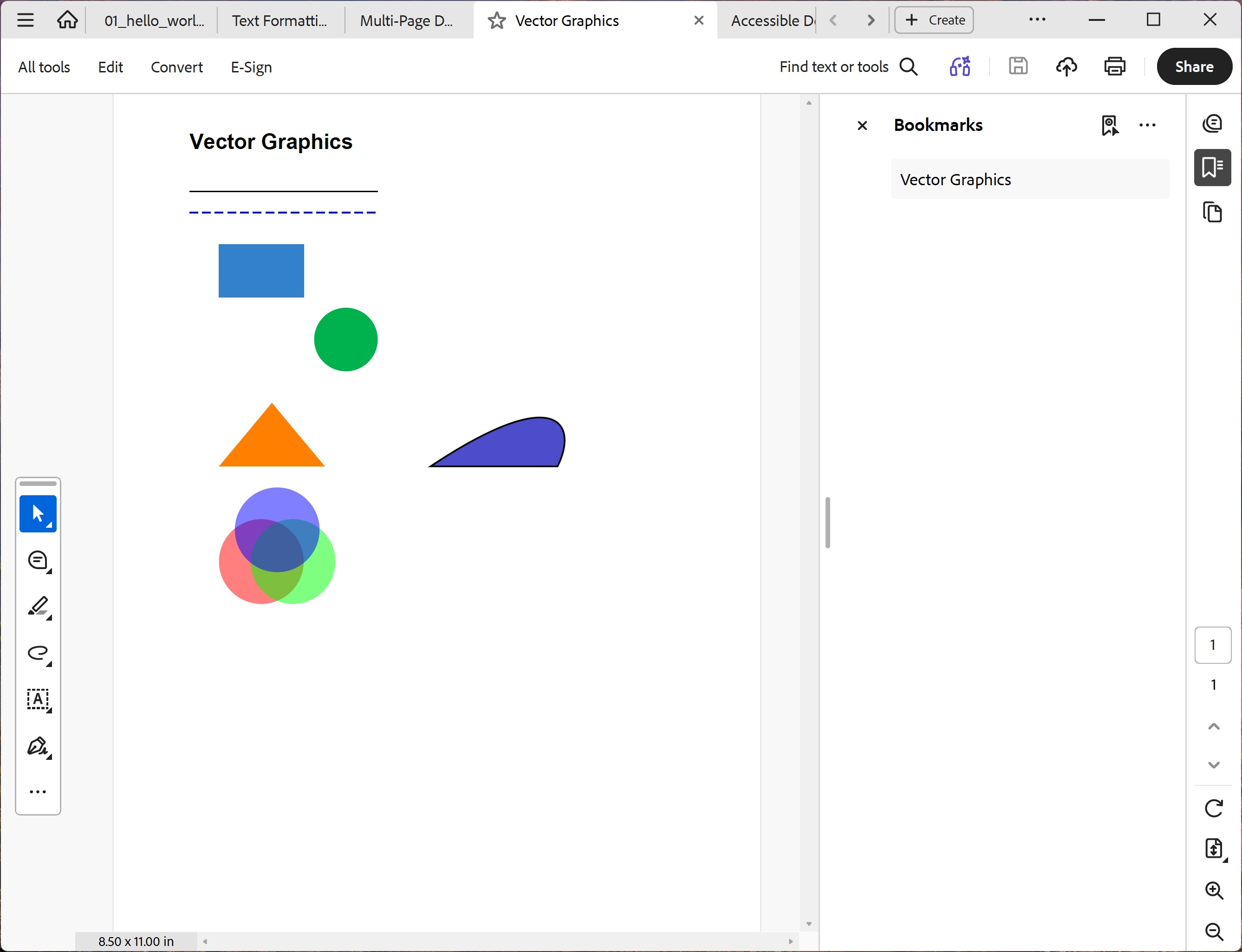
You should see (top to bottom): a solid black line and a dashed blue line; a blue filled rectangle and a green filled circle; an orange triangle; a closed blue Bézier shape; and three overlapping semi-transparent red, green, and blue circles showing alpha blending.
File: 04_vector_graphics.pdf
Drawing Methods
| Method | Description |
|---|---|
DrawLine() | Line between two points |
DrawRectangle() / FillRectangle() | Rectangle outline / filled |
DrawCircle() / FillCircle() | Circle outline / filled |
DrawEllipse() / FillEllipse() | Ellipse outline / filled |
DrawPolygon() / FillPolygon() | Polygon outline / filled |
BeginPath() | Start custom path (lines, curves) |
SetAlpha() | Set stroke/fill transparency (0.0–1.0) |